- Домашняя страница /
- Офисные товары /
- Офисная электроника /
- Printers & Accessories /
- Computer Printers /
- Лазерные принтеры /
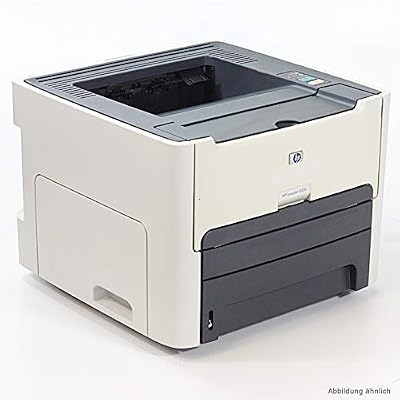
- HP LaserJet 1320 Q5927A
0 ratings


Secured transaction
Ubuy works hard to protect your security and privacy. Our advanced payment security system ensures confidentiality by encrypting your information during transmission using AES (Advanced Encryption Standards) and SSL (Secure Socket Layer) protocols. Your payment details are 100% secure as we do not share your payment details with third party sellers.
Our Top Logistics Partners


Produce professional black-and-white documents quickly and easily with the HP LaserJet 1320 printer

Fast
Shipping

Free
Return*

Secure Packaging

100% Original Products

PCI DSS Compliance

ISO 27001 Certified


Note: Step Down Voltage Transformer required for using electronics products of США store (110-120). Recommended power converters Купите сейчас.


What Stands Out
Fast Printing Speed
The HP LaserJet 1320 offers rapid print speeds of up to 30 pages per minute, ensuring efficient workflow for both home offices and small businesses with high-volume printing needs.
Compact Design
Its space-saving design makes the HP LaserJet 1320 ideal for small workspaces, providing powerful performance without occupying unnecessary space.
Cost-Effective Toner
Utilizing economical toner cartridges, the HP LaserJet 1320 helps reduce overall printing costs while maintaining high-quality output, making it a budget-friendly choice for users.
Информация о продукте
- HP LaserJet 1320 Q5927A printer
- Produces professional black-and-white documents at 1200x1200 DPI
- Prints at a speed of 22 pages per minute
- Includes printer cable and power cord
- Ideal for individuals and small workteams
- Offers automatic two-sided printing and flexible networking options
| Item Weight | 25 lbs (11.34 kg) |
Who Should Buy?

-
Small Businesses
Ideal for small offices needing reliable, high-quality printing with a low cost per page and fast output.
-
Home Offices
Great choice for home-based professionals requiring efficient document printing without the need for color printing.
-
Students
Perfect for students needing to print reports and assignments regularly, benefiting from its affordability and ease of use.

-
High Volume Users
Not suitable for environments with extremely high printing demands due to its slower print speed compared to newer models.
-
Graphic Designers
Lacks color printing features essential for graphic design work, making it unsuitable for professionals in this field.
-
Mobile Workers
Does not support wireless printing, making it less convenient for users who require mobile printing capabilities.
ОПИСАНИЕ ТОВАРА
HP LaserJet 1320 Q5927A
Есть вопрос? Пообщайтесь с нами в чате
Вопросы и ответы клиентов
-
вопрос:
What type of printer is the HP LaserJet 1320 Q5927A?
отвечать: The HP LaserJet 1320 Q5927A is a monochrome laser printer designed for efficient and high-quality black-and-white printing. Ideal for small businesses and home offices, this printer uses laser technology, which allows for faster printing speeds and lower cost-per-page compared to inkjet printers. It's suitable for producing professional documents, reports, and contracts, making it a reliable choice for users who seek quality and performance. -
вопрос:
What is the printing speed of the HP LaserJet 1320?
отвечать: The HP LaserJet 1320 Q5927A boasts a printing speed of up to 22 pages per minute (ppm). This fast printing capability ensures that you can quickly produce a large volume of documents, which is especially important in a busy office environment where time is of the essence. With this printer, you can efficiently handle tasks like printing presentations or bulk handouts without unnecessary delays. -
вопрос:
Does the HP LaserJet 1320 support duplex printing?
отвечать: No, the HP LaserJet 1320 Q5927A does not support automatic duplex printing. However, you can manually print on both sides of the paper by alternating the pages, which is a great way to save paper and reduce costs. This feature can be particularly useful for users looking to minimize waste while still printing double-sided documents for presentations or reports. -
вопрос:
What types of media can I use with the HP LaserJet 1320?
отвечать: The HP LaserJet 1320 Q5927A is compatible with a variety of media types, including envelopes, labels, plain paper, and heavier printing stocks. It can handle media sizes ranging from A4 to legal, making it versatile for both personal and professional use. This versatility allows you to print business cards, marketing materials, and diverse documents tailored to your specific needs. -
вопрос:
What kind of connectivity options does the HP LaserJet 1320 offer?
отвечать: The HP LaserJet 1320 Q5927A includes USB connectivity, which means it can easily connect to your computer or laptop for direct printing. While it lacks wireless capabilities, this direct connection ensures reliable performance and is particularly advantageous for users who prioritize a stable connection when printing sensitive documents or large volumes. -
вопрос:
Is the HP LaserJet 1320 compatible with Mac and Windows operating systems?
отвечать: Yes, the HP LaserJet 1320 Q5927A is compatible with both Mac and Windows operating systems. This compatibility makes it accessible to a wide range of users, regardless of their preferred platform. You can easily install the necessary drivers from the HP website, enabling smooth operation and integration within various operating systems. -
вопрос:
How can I replace the toner cartridge in the HP LaserJet 1320?
отвечать: To replace the toner cartridge in the HP LaserJet 1320 Q5927A, simply open the printer cover, remove the empty toner cartridge by lifting it out of its slot, and then insert the new cartridge until it clicks securely into place. Ensure you follow the manufacturer's instructions for best results. Regularly replacing the toner can help maintain print quality and avoid issues like streaking or fading in your documents. -
вопрос:
What is the maximum monthly duty cycle of the HP LaserJet 1320?
отвечать: The HP LaserJet 1320 Q5927A has a maximum monthly duty cycle of up to 30,000 pages. This means it is built to handle high-volume printing demands, making it ideal for busy work environments where the need for consistent and reliable performance is essential. It's important to stay within this limit to maintain optimal performance and to avoid wear and tear on the printer. -
вопрос:
Can I use third-party toner cartridges with the HP LaserJet 1320?
отвечать: While you can use third-party toner cartridges with the HP LaserJet 1320 Q5927A, it's recommended to use HP-brand cartridges for the best quality and performance. Using non-genuine cartridges may void your warranty and affect print quality. Genuine cartridges are specifically designed to work with your printer, ensuring the best results and longevity of the device. -
вопрос:
Where can I buy the HP LaserJet 1320 Q5927A in Azerbaijan?
отвечать: You can purchase the HP LaserJet 1320 Q5927A through Ubuy in Azerbaijan. Ubuy offers a wide selection of products, ensuring that you can find this printer along with various compatible accessories and supplies. With secure payment options and reliable shipping, shopping on Ubuy guarantees a smooth buying experience for your printing needs.
HP Laser Printers Editorial Review
The HP LaserJet 1320 (Q5927A) printer has received mixed reviews from customers. One customer reported receiving a printer with broken parts, a missing back door, and ineffective printing. Another customer found the printer to be slower than newer models, but reliable. However, the printer was described as a "workhorse" by one customer who uses it to print payroll checks. Another customer had initial print quality issues with the supplied toner, but found success when using alternate toner cartridges. Another customer opted to purchase this printer as a replacement for a broken Brother Mono-Laser printer. They found that the HP printer was reliable and easy to install, albeit without the convenience of wireless network printing. Despite being an older model, customers noted that the printer continues to function well after eight years.
Customer Reviews & Ratings
1 оценки клиентов
-
5 звезда
100%
-
4 звезда
0%
-
3 звезда
0%
-
2 звезда
0%
-
1 звезда
0%
Оцените этот товар
Поделитесь своими впечатлениями
Плюсы
- Reliable
- Good value for money
- Easy installation
- Can continue to function well after many years
Минусы
- Slower than newer models
Product Price History
Важная информация
- Ограничения: обратите внимание, что для товаров, поставляемых за границу, гарантия производителя может быть недействительной; обслуживание от производителя может быть недоступно; руководства по эксплуатации, а также инструкции и предупреждения о безопасности могут быть не на языках страны назначения; товары (и сопутствующие материалы) могут не быть разработаны в соответствии со стандартами, спецификациями и требованиями к маркировке страны назначения; товары также могут не соответствовать напряжению в стране назначения и другим электрическим стандартам (при необходимости требуется использование адаптера или преобразователя). Получатель несет ответственность за обеспечение законного ввоза товара в страну назначения. При заказе через Ubuy или его аффилированных лиц получатель является зарегистрированным импортером и должен соблюдать все законы и правила страны назначения.
- Не все товары на Ubuy выставлены на продажу, поскольку Ubuy — это глобальная поисковая система. На товары распространяются законы в области экспорта и торговли.
Currently unavailable.
We don't know when or if this item will be back in stock.
This item is not restrict in my country.(Please click on above link if this item is not restrict in your country, So our team will review and allow.)
Secured transaction
Ubuy works hard to protect your security and privacy. Our advanced payment security system ensures confidentiality by encrypting your information during transmission using AES (Advanced Encryption Standards) and SSL (Secure Socket Layer) protocols. Your payment details are 100% secure as we do not share your payment details with third party sellers.
Our Top Logistics Partners
Fastest cross-border delivery
Особенности и преимущества
- Ideal for individuals and small workteams with flexible networking options
- Automatic two-sided printing and print speeds up to 21 pages per minute
- Maximum duty cycle of 10,000 pages per month with a maximum resolution of 1200 x 1200 DPI
- Standard input capacity of 250 sheets and output capacity of 125 sheets
- Includes printer cable and power cord with 22 pages per minute for fast, reliable performance
- Duplex printing to save on paper costs