0 ratings






Məhsul #:
1485368
Microsoft Surface Dock for Surface Pro 3, Surface Pro 4, and Surface Book
87% of respondents would recommend this to a friend
Məhsul #:
1485368
AZN 197
Price Details
Excluding Shipping & Custom charges ( Shipping and custom charges will be calculated on checkout )
*All items will import from ABŞ
Stokda
 USA mağazasından idxal olunur
QTY:
Yalnız 5 məhsullar stokda qalıb.
Elə indi sifariş verin və əldə edin Çərşənbə, Sentyabr 16
Secured transaction
Ubuy works hard to protect your security and privacy. Our advanced payment security system ensures confidentiality by encrypting your information during transmission using AES (Advanced Encryption Standards) and SSL (Secure Socket Layer) protocols. Your payment details are 100% secure as we do not share your payment details with third party sellers.
Our Top Logistics Partners


Instantly transform your Surface into a desktop PC.

Fast
Shipping

Free
Return*

Secure Packaging

100% Original Products

PCI DSS Compliance

ISO 27001 Certified



Note: Step Down Voltage Transformer required for using electronics products of ABŞ store (110-120). Recommended power converters İndi almaq.


What Stands Out
Multiple Connections
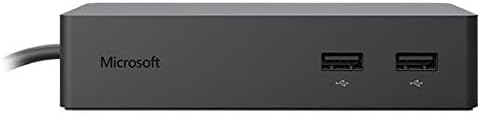
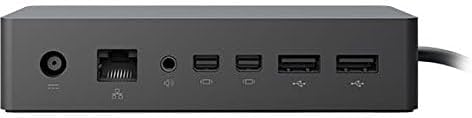
Equipped with four USB ports and Ethernet, this dock provides versatile connectivity options for peripherals and high-speed internet access, enhancing productivity without compromising on functionality.
Device Compatibility
Designed specifically for Surface Pro 3, Pro 4, and Surface Book, ensuring seamless integration and optimal performance, making it the perfect accessory for Surface users seeking enhanced versatility.
Sleek Design
The black, minimalist design of the Surface Dock not only complements your devices but also fits effortlessly into any workspace, combining style and utility without clutter.
Məhsul təfərrüatları
- Transform your Surface into a desktop PC with the Microsoft Surface Dock
- Connect external monitors, keyboard, mouse, and more
- Includes two high-definition video ports and four high-speed USB 3.0 ports
- Features a Gigabit Ethernet port for fast and reliable network connection
- Easy setup with Surface Connect technology
- Compatible with Surface Pro 3, Surface Pro 4, and Surface Book
| Hardware Interface | Ethernet, USB 3.0 |
| Compatible Devices | Microsoft Surface Pro 3, 4, (5th Gen), 6, 7, 7+, 8, X, Laptop (1st 2, 3 (all models), 4 Go, Studio, Book 2 Go and 2. |
| Total Usb Ports | 4 |
| Number of Ports | 11 |
| Item Dimensions L x W x H | 5.1"L x 2.4"W x 1.2"H (13 x 6.1 x 3 cm) |
| Item Weight | 2 pounds (910 grams) |
| Color | Black |
| Brand | Microsoft |
| Number of Items | 1 |
| Global Trade Identification Number | 00889842013702 |
| UPC | 889842013702 |
| Item Highlight | 4 USB Ports, USB 3.0 Hardware Interface (Black) |
| Manufacturer | Microsoft |
| Model Number | PF3-00005 |
| Mfr Part Number | PF3-00005 |
| Compatible Devices | Microsoft Surface Pro 3, 4, (5th Gen), 6, 7, 7+, 8, X, Laptop (1st 2, 3 (all models), 4 Go, Studio, Book 2 Go and 2. See more |
| Total USB Ports | 4 |
| Product Dimensions (L x W x H) | 5.1"L x 2.4"W x 1.2"H (13 x 6.1 x 3 cm) |
Who Should Buy?

-
Office Professionals
Ideal for office workers needing multiple USB ports and Ethernet connectivity for efficient workstations.
-
Frequent Travelers
Perfect for mobile professionals who require a quick dock solution for presentations and connectivity while traveling.
-
Tech Enthusiasts
Enthusiasts who want to expand their device's capabilities with multiple peripherals and accessories will benefit greatly.

-
Casual Users
Not suitable for occasional users who do not require extensive ports or specific connectivity options.
MƏHSUL TƏSVİRİ
Sorğunuz var? Bizimlə söhbət edin
Müştəri Sualları və Cavabları
-
Sual:
What devices are compatible with the Microsoft Surface Dock?
Cavab: The Microsoft Surface Dock is designed specifically for the Surface Pro 3, Surface Pro 4, and Surface Book. This means it integrates seamlessly with these devices, providing additional connectivity options. By leveraging the Surface Connect technology, users can easily connect their Surface devices to the dock, effectively turning them into a workstation setup. You can use the dock to connect to larger displays, external storage, and network resources, enhancing productivity, especially in office environments. -
Sual:
How many USB ports are available on the Microsoft Surface Dock?
Cavab: The Microsoft Surface Dock features four USB 3.0 ports, allowing you to connect multiple peripherals simultaneously. This is particularly useful for users who need to attach devices like external hard drives, mice, keyboards, and other USB accessories without the hassle of unplugging and replugging them. This versatility helps keep your workspace organized and efficient, making it ideal for both home and professional use. -
Sual:
Can the Surface Dock provide power to my Surface device?
Cavab: Yes, the Microsoft Surface Dock provides power to your Surface Pro or Surface Book while connected. This ensures that your device is always charged and ready to go, eliminating the need for additional power adapters. It's particularly beneficial for users who might need to quickly transition between mobile work scenarios and more stationary setups, ensuring uninterrupted usage throughout the day. -
Sual:
What is the primary function of the Ethernet port on the Surface Dock?
Cavab: The Ethernet port on the Microsoft Surface Dock allows you to connect your Surface device to a wired Ethernet network. This functionality is essential for users who require a stable and faster internet connection compared to wireless, especially in a business setting where video conferencing and large file transfers are common. Having a dependable internet source helps improve productivity and guarantees efficient online operations. -
Sual:
Is the Microsoft Surface Dock compatible with Surface Book chargers?
Cavab: While the Microsoft Surface Dock does not directly replace the Surface Book charger, it can simultaneously charge your Surface Book while connected, thanks to its built-in power delivery feature. This dual functionality enables you to connect multiple accessories while ensuring your device stays charged during use. This is particularly advantageous for users who prefer a single connection point for both power and peripherals. -
Sual:
How does the Surface Dock enhance multitasking?
Cavab: By connecting multiple external displays and peripherals through the Microsoft Surface Dock, users can significantly enhance their multitasking capabilities. The dock allows you to connect dual 4K monitors, effectively expanding your workspace. This setup is perfect for professionals who need to compare documents side-by-side, participate in video calls while analyzing data, or perform extensive graphic design work, providing a more organized and efficient work environment. -
Sual:
What type of video outputs does the Surface Dock support?
Cavab: The Microsoft Surface Dock supports two Mini DisplayPort outputs, allowing you to connect dual monitors. This feature provides flexibility in configuring your workspace, whether you prefer extended display mode for multitasking or mirrored displays for presentations. Leveraging high-resolution output options, users can enjoy clearer visuals and larger viewing areas, ideal for creative professionals, designers, or anyone frequently working with multiple applications. -
Sual:
Can I connect other devices through the Surface Dock's USB ports?
Cavab: Absolutely! The USB 3.0 ports on the Microsoft Surface Dock allow for the connection of various devices such as printers, scanners, external drives, and more. This functionality makes it a versatile hub where you can centralize your connections. Whether you're printing documents for a client meeting or backing up essential data, the dock streamlines the process and keeps your workspace tidy. -
Sual:
Is the Microsoft Surface Dock portable?
Cavab: The Microsoft Surface Dock is compact and designed to be portable, making it ideal for users who travel between office spaces or work from different locations. While it isn't as lightweight as the Surface device itself, it’s easy to carry in a laptop bag or backpack. This ensures that you can set up a powerful workstation anywhere you go, helping maintain productivity regardless of your working environment. -
Sual:
Where can I buy Microsoft Surface Dock for Surface Pro 3, Surface Pro 4, and Surface Book in Azerbaijan?
Cavab: You can purchase the Microsoft Surface Dock for Surface Pro 3, Surface Pro 4, and Surface Book from Ubuy in Azerbaijan. Ubuy offers a wide selection of tech accessories and ensures a smooth ordering process, making it convenient for you to get the gear you need to enhance your Surface device experience. With Ubuy, you can easily find exactly what you need for your setup.
Microsoft Docking Stations PF3-00005 Editorial Review


Microsoft Surface Dock for Surface Pro 3, Surface Pro 4, and Surface Book offers seamless connectivity and power for a wide array of devices. With a robust hardware interface that includes Ethernet and 4 USB 3.0 ports, it provides extensive options for peripherals, making it ideal for users needing to connect multiple devices effortlessly. Reviewers commend its solid construction and ease of use, allowing for quick connections to monitors and other devices through a simple magnetic plug. It's important to note that some users experienced occasional connection issues, but overall, the dock is praised for its reliability and performance, making it a valuable addition for Surface users needing a desktop-like setup.
Customer Reviews & Ratings
679 müştərilərin reytinqləri
-
5 ulduz
80%
-
4 ulduz
12%
-
3 ulduz
4%
-
2 ulduz
1%
-
1 ulduz
3%
Bu məhsulu nəzərdən keçirin
Fikirlərinizi digər müştərilərlə bölüşün
Pros
- Quick and easy plug-and-play functionality
- Solid construction ensuring durability
- Supports multiple external monitors
- Lightweight and compact design
- Versatile connectivity options with USB 3.0
Eksiler
- A bit bulky when connected to the tablet
Platform Trust & Buyer Confidence

MA
Mohammad
Verified buyer
“Excellent quality and original too,when ubuy send original things I will appreciate that ,I very satisfied thank you”
23 July 2026 · via Trustpilot
CK
Chitra
Verified buyer
“The order and delivery progress was communicated very well. Package arrived within the estimated time. Products arrived as expected in good condition.”
22-Jul-26 · via Trustpilot
K
kund
Verified buyer
“Good supply of products. Safe payment methods, and shipment worldwide! Genuine products.”
23-Jul-26 · via Trustpilot
OO
Onesi
Verified buyer
“Was my first time buying a product from Ubuy, but I found it so helpful. This is reliable. Gonna place a new order!”
22 July 2026 · via Trustpilot
SJ
SAO JOHN
Verified buyer
“Ubuy is a great online platform to buy stuff. Reliable, fast delivery time and great value for money. I've been using Ubuy online shopping platform for three years now and will continue to do so.”
23 July 2026 · via Trustpilot
Təhlükəsiz Ödəmə
Global Delivery
Easy Returns
Genuine Products
Product Price History
Vacib məlumat
- Məhdudiyyətlər: Zəhmət olmasa unutmayın ki, beynəlxalq göndərilən məhsullar üçün, hər hansı bir istehsalçı zəmanəti keçərli olmaya bilər; istehsalçının xidmət seçimləri mövcud olmaya bilər; məhsul təlimatları, göstərişləri və təhlükəsizlik xəbərdarlıqları təyinat ölkəsinin dillərində olmaya bilər; məhsullar (və müşayiət olunan materiallar) təyinat ölkəsinin standartlarına, spesifikasiyalarına və etiketləmə tələblərinə uyğun olaraq dizayn edilməmiş ola bilər; və məhsullar təyinat ölkəsinin gərginliyinə və digər elektrik standartlarına uyğun olmaya bilər (lazım olduqda adapter və ya konvertordan istifadə tələb olunur). Alıcı məhsulun təyinat ölkəsinə qanuni olaraq idxal oluna biləcəyini təmin etmək üçün cavabdehdir. Ubuy və ya onun filiallarından sifariş verərkən, alıcı qeydin idxalçısıdır və təyinat ölkəsinin bütün qanun və qaydalarına riayət etməlidir.
- Ubuy qlobal bir axtarış motoru olduğu üçün Ubuy-də sadalanan bütün məhsullar satışda deyil.Məhsullar ixrac/ticarət qaydalarına tabedir.
AZN 197
Elə indi sifariş verin və əldə edin Çərşənbə, Sentyabr 16
This item is not restrict in my country.(Please click on above link if this item is not restrict in your country, So our team will review and allow.)
QTY:
Yalnız 5 məhsullar stokda qalıb.
Secured transaction
PCI DSS compliant and ISO 27001:2022 certified, with encrypted payments and full buyer protection on every order.
Our Top Logistics Partners
Fastest cross-border delivery
Xüsusiyyətlər və Üstünlüklər
- Plug in the Surface Connect cable to charge your device and access external monitors, keyboard, mouse, and more.
- All the ports you need in a sleek, compact design.
- Lightning fast data transfer with minimalist design.
- Quick and easy setup.
- Compatible with Microsoft Tablet PC/Notebook: Surface Pro 3, Surface Pro 4, Surface Book.
- 1 Year limited warranty.
Ubuy Assurance
Experience worry-free shopping with 100% original products, PCI DSS-compliant payment security, ISO 27001-certified data protection, the fastest cross-border delivery, free returns *, and secure packaging on every order.