0 ratings





Məhsul #:
47106722
SCREENARAMA New Screen Replacement for Lenovo Ideapad 330 17 inch, FHD 1920x1080, IPS, Matte, LCD LED Display with Tools
Məhsul #:
47106722
AZN 221
Price Details
Excluding Shipping & Custom charges ( Shipping and custom charges will be calculated on checkout )
*All items will import from ABŞ
Stokda
 USA mağazasından idxal olunur
QTY:
Bu məhsul Ubuy tərəfindən Yerinə yetirilmir və çatdırılma ən az 10 gün çəkə bilər. Bu məhsulun çatdırılması ilə bağlı hər hansı bir problem yaranarsa, məhsulu sifarişdən ləğv edə və ya pulunuzu geri qaytara bilərik.
Secured transaction
Ubuy works hard to protect your security and privacy. Our advanced payment security system ensures confidentiality by encrypting your information during transmission using AES (Advanced Encryption Standards) and SSL (Secure Socket Layer) protocols. Your payment details are 100% secure as we do not share your payment details with third party sellers.
Our Top Logistics Partners


Guaranteed compatibility with your Lenovo Ideapad 330.

Fast
Shipping

Free
Return*

Secure Packaging

100% Original Products

PCI DSS Compliance

ISO 27001 Certified


Note: Step Down Voltage Transformer required for using electronics products of ABŞ store (110-120). Recommended power converters İndi almaq.


What Stands Out
High Definition Clarity
Delivers stunning HD+ resolution of 1600x900, ensuring sharp visuals and vibrant colors for an enhanced viewing experience. Ideal for both entertainment and productivity.
Complete Package
Includes essential tools for a hassle-free installation, making it easy even for beginners to replace their screen without requiring professional assistance.
Compatible Design
Specifically designed for Lenovo Ideapad 330, ensuring perfect fit and seamless integration, which addresses common screen replacement issues faced with generic alternatives.
Məhsul təfərrüatları
- Designed for DIY installation with included tools.
- IPS Wide View Matte finish reduces glare and improves viewing angles.
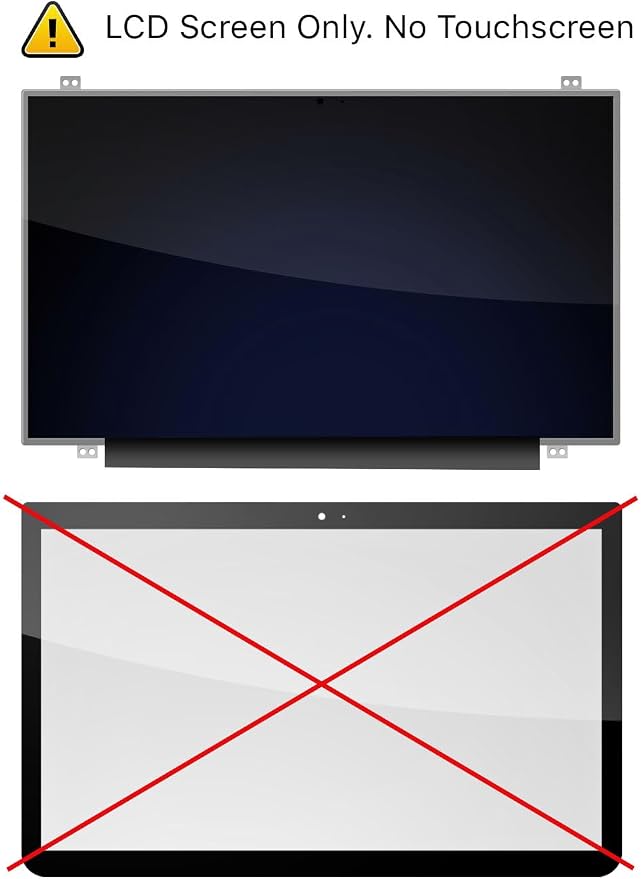
- Works for 1920x1080 FHD resolution. 30-pin connector. For Non-Touch laptops.
- Please, make sure your original screen has the same specifications before purchasing.
| Manufacturer | SCREENARAMA |
| Item model number | Lenovo Ideapad 330 17 inch |
| Date First Available | July 19, 2019 |
| Item Weight | 2.5 lbs (1.13 kg) |
Who Should Buy?

-
DIY Enthusiasts
Ideal for those comfortable with laptop repairs who want to replace a damaged screen themselves.
-
Budget-Conscious Users
Great for users seeking an affordable screen replacement option without compromising quality for their Lenovo Ideapad.
-
Frequent Travelers
Beneficial for users needing a quick beyond-the-warranty fix for their laptop screens while on the go.

-
Non-Tech Savvy Users
Not suitable for users lacking technical skills, as installation may require a degree of expertise.
-
Gaming Enthusiasts
May not meet the high performance needs of gamers requiring better resolution and refresh rates.
-
Professionals Needing Perfection
Less ideal for professionals requiring top-tier display quality for graphic design or video editing tasks.
MƏHSUL TƏSVİRİ
Sorğunuz var? Bizimlə söhbət edin
Müştəri Sualları və Cavabları
-
Sual:
What type of display is the SCREENARAMA New Screen Replacement for Lenovo Ideapad 330?
Cavab: The SCREENARAMA New Screen Replacement features an HD LCD LED display with a resolution of 1600x900 pixels. This glossy display offers vibrant colors and sharp images, enhancing your viewing experience whether for work or entertainment. The glossy finish adds a polished look that can make content appear more visually appealing. Ideal scenarios for this screen replacement include enjoying media, gaming, or working on graphic design projects that require accurate color representation. -
Sual:
Is the SCREENARAMA screen compatible with other Lenovo models?
Cavab: The SCREENARAMA New Screen Replacement is specifically designed for the Lenovo Ideapad 330 17-inch models. While it shares some similarities with other Lenovo screens, compatibility can vary based on size, resolutions, and connectors. To ensure the perfect fit and functionality, always verify your model number against the specifications of the replacement screen. This is particularly crucial if you are considering repairs or upgrades to other Ideapad models, as using an incompatible screen may lead to display issues. -
Sual:
What tools are included with the SCREENARAMA screen replacement?
Cavab: The SCREENARAMA New Screen Replacement comes with essential tools that aid in the installation process. This typically includes screwdrivers, plastic opening tools, and other necessary components that facilitate a smooth replacement. Using the right tools is important to avoid damage to your laptop or the new screen. When replacing your screen, having these tools on hand can enhance your accuracy and efficiency, ensuring a successful and secure installation. -
Sual:
How do I install the SCREENARAMA screen replacement?
Cavab: Installing the SCREENARAMA New Screen Replacement involves several steps: first, power off your laptop, remove the battery if possible, and unscrew the bezel. Then, carefully detach the old screen connector and replace it with the new screen, securing it in place. Each step requires attention to detail to avoid damaging internal components. Many users have successfully replaced their screens by following online tutorials or guides, making it feasible for those comfortable with DIY laptop repairs. -
Sual:
What are the benefits of having a glossy display?
Cavab: Glossy displays, such as the SCREENARAMA New Screen Replacement, provide vibrant color reproduction and sharper images, making visuals more striking. They're ideal for watching movies, editing photos, and performing tasks that require high color accuracy. However, they can reflect light more than matte screens, which might be a concern in well-lit environments. Understanding your work environment can help you decide if a glossy display suits your needs. -
Sual:
What resolution does the SCREENARAMA screen provide?
Cavab: The SCREENARAMA New Screen Replacement offers HD resolution at 1600x900 pixels. This resolution strikes a balance, providing clear images for streaming videos, browsing, and general productivity tasks without demanding excessive processing power from your device. Users commonly report improved clarity in day-to-day usage, making it a popular choice for educational purposes, casual gaming, and multimedia consumption. -
Sual:
Is the SCREENARAMA screen durable?
Cavab: Yes, the SCREENARAMA New Screen Replacement is designed for high durability and performance in various environments. It is built to withstand everyday use, making it suitable for students, professionals, or anyone frequently on the go. Proper care, such as using a protective case and being cautious during transport, can further extend its lifespan. This durability ensures that it can handle tasks ranging from casual browsing to intense professional work. -
Sual:
Can I use the SCREENARAMA screen for gaming?
Cavab: Absolutely, the SCREENARAMA New Screen Replacement with its HD 1600x900 resolution provides sufficient clarity and refresh rate suitable for casual gaming. While it may not match high-end gaming monitors in performance, it is well-regarded by users for gaming on the Lenovo Ideapad 330. Ideal for lighter games or PC titles that don't require top-tier specifications, it ensures a satisfying gaming experience for casual players. -
Sual:
What should I do if the screen does not work after installation?
Cavab: If the SCREENARAMA New Screen Replacement does not function after installation, first check all connections to ensure the screen is correctly secured and plugged into the motherboard. If everything appears to be in order, consult troubleshooting guides or forums for additional solutions. Users often find that double-checking their installation and connections resolves most issues. It is also beneficial to seek assistance from technical support if needed. -
Sual:
Where can I buy the SCREENARAMA New Screen Replacement for Lenovo Ideapad 330?
Cavab: You can buy the SCREENARAMA New Screen Replacement for Lenovo Ideapad 330 at Ubuy. This platform offers a wide selection of electronic components, including various laptop screens, making it a reliable option for your repair needs. When purchasing from Ubuy, you can expect a streamlined process and access to product information that will help you make an informed choice.
SCREENARAMA Replacement Screens Lenovo Ideapad 330 17 inch Editorial Review
The SCREENARAMA New Screen Replacement for the Lenovo Ideapad 330 17 inch comes with tools for removal/installation, which were of good quality. The screwdriver was magnetic, making it easier to handle tiny screws. One customer commented that replacing the screen was not as hard as initially thought and encouraged others to give it a try. The screen was a perfect fit, looked nice and performed well. One customer was disappointed that the plug-in was on the right side instead of the left side, as shown in the pictures. However, overall, customers were pleased with the product and found it easy to install with no issues.
Customer Reviews & Ratings
1 müştərilərin reytinqləri
-
5 ulduz
100%
-
4 ulduz
0%
-
3 ulduz
0%
-
2 ulduz
0%
-
1 ulduz
0%
Bu məhsulu nəzərdən keçirin
Fikirlərinizi digər müştərilərlə bölüşün
Pros
- Comes with tools for removal/installation
- Good quality tools, including a magnetic screwdriver
- Perfect fit for Lenovo Ideapad 330 17 inch
Eksiler
- Plug-in location of screen may differ from pictures
Product Price History
Vacib məlumat
- Məhdudiyyətlər: Zəhmət olmasa unutmayın ki, beynəlxalq göndərilən məhsullar üçün, hər hansı bir istehsalçı zəmanəti keçərli olmaya bilər; istehsalçının xidmət seçimləri mövcud olmaya bilər; məhsul təlimatları, göstərişləri və təhlükəsizlik xəbərdarlıqları təyinat ölkəsinin dillərində olmaya bilər; məhsullar (və müşayiət olunan materiallar) təyinat ölkəsinin standartlarına, spesifikasiyalarına və etiketləmə tələblərinə uyğun olaraq dizayn edilməmiş ola bilər; və məhsullar təyinat ölkəsinin gərginliyinə və digər elektrik standartlarına uyğun olmaya bilər (lazım olduqda adapter və ya konvertordan istifadə tələb olunur). Alıcı məhsulun təyinat ölkəsinə qanuni olaraq idxal oluna biləcəyini təmin etmək üçün cavabdehdir. Ubuy və ya onun filiallarından sifariş verərkən, alıcı qeydin idxalçısıdır və təyinat ölkəsinin bütün qanun və qaydalarına riayət etməlidir.
- Ubuy qlobal bir axtarış motoru olduğu üçün Ubuy-də sadalanan bütün məhsullar satışda deyil.Məhsullar ixrac/ticarət qaydalarına tabedir.
AZN 221
Bu məhsul Ubuy tərəfindən Yerinə yetirilmir və çatdırılma ən az 10 gün çəkə bilər. Bu məhsulun çatdırılması ilə bağlı hər hansı bir problem yaranarsa, məhsulu sifarişdən ləğv edə və ya pulunuzu geri qaytara bilərik.
This item is not restrict in my country.(Please click on above link if this item is not restrict in your country, So our team will review and allow.)
QTY:
Secured transaction
Ubuy works hard to protect your security and privacy. Our advanced payment security system ensures confidentiality by encrypting your information during transmission using AES (Advanced Encryption Standards) and SSL (Secure Socket Layer) protocols. Your payment details are 100% secure as we do not share your payment details with third party sellers.
Our Top Logistics Partners
Fastest cross-border delivery
Xüsusiyyətlər və Üstünlüklər
- Replace your Lenovo Ideapad 330 screen effortlessly.
- High-definition resolution of 1600x900 for clear visuals.
- Glossy finish enhances your viewing experience.
- Includes necessary tools for a hassle-free installation.
- Tested for durability and performance.
- Perfectly compatible with a 30 pin connector.